By Jayson · Updated July 2026 · 6-minute read
How to calibrate a bathroom scale- Quick answer: most digital bathroom scales self-calibrate — step on briefly, step off, wait for 0.0, then step on to weigh. If readings stay inconsistent, do a full reset: remove the batteries, hold the power button for 10-15 seconds, reinsert fresh batteries, and wait for 0.0. Always use the same spot on a hard, flat floor. Consistency matters far more than absolute accuracy for weight tracking.
Step on your bathroom scale three times in a row. If you get three different numbers, the scale isn't broken — this is normal, and fixable. Learning how to calibrate a bathroom scale properly is less about a calibration weight and more about a routine, since most consumer models don't have a true user calibration mode at all.
Here's how to calibrate a bathroom scale properly: why the readings actually vary, the real tap-and-wait routine that fixes most complaints, and the full reset to run when it doesn't.
In this guide
- Why bathroom scales give different readings
- What you need before you start
- Consistency tester: is your scale reliable?
- Step-by-step calibration and reset
- Reset sequences by brand
- Accuracy test
- Troubleshooting
- How often to calibrate
- FAQ
How to Calibrate a Bathroom Scale: Why Readings Vary
Digital bathroom scales are reasonably accurate and consistent for home use when used correctly — bathroom scales work by measuring the flex in four load cells, one under each corner. How the weight distributes across those four sensors changes depending on exactly where you stand and how your weight shifts — which is why moving the scale 10cm gives a different number, and why leaning forward reads differently than leaning back.
The surface is the biggest factor most guides ignore. Bathroom tiles with grout lines under the scale feet cause each foot to sit at a slightly different height, introducing a real lever-arm error, since the scale's four sensors assume even support. Carpet compresses under weight and makes the error worse. The scale needs all four feet on the same hard, flat plane to read consistently.
Battery depletion is the second most common cause. A low battery doesn't just affect the display — it reduces the sensor's ability to accurately detect small weight changes. If your scale has been erratic and the batteries haven't been changed recently, start there before doing anything else.
Body weight itself fluctuates, too. It's normal for weight to vary by roughly 0.5 to 2kg over the course of a day due to food and fluid intake, clothing, and natural biological cycles. A "wrong" reading may actually be correct — just taken at a different point in your body's daily swing.
How to Calibrate a Bathroom Scale: What You Need First
Gather these before you start learning how to calibrate a bathroom scale:
- A hard, flat floor. Hard tile (check for grout lines under the feet), hardwood, or laminate. Not carpet, not a bath mat. The same spot every time.
- Fresh batteries. If readings are erratic, replace the batteries before doing anything else — this is the number one fix.
- Bare feet. Socks absorb moisture and shift weight distribution. Weigh with bare feet in the same position each time.
- A consistency routine. Same time of day, ideally morning before eating, same clothing, same spot. Your weight can vary by a kilogram or two across a single day — the scale isn't wrong, your body is different at different times.
The real point of "calibrating" a bathroom scale is different from a jewelry or postal scale: unlike precision scales, bathroom scales don't typically have a user-accessible calibration mode with a weight-placement step. What people call calibrating one is actually two things — making sure the self-calibration routine runs correctly, and performing a full reset to clear any stored zero-point drift. The goal is consistent, repeatable readings, not certified accuracy to the gram.
How to Calibrate a Bathroom Scale: Test Its Consistency First
Before worrying about calibration, test whether your scale is consistent. Step on three times in the same spot without moving the scale, and enter the three readings below.
Scale consistency test
Step on and off three times without moving the scale. Enter each reading in kg or lbs — just be consistent about the unit.
How to Calibrate a Bathroom Scale, Step by Step
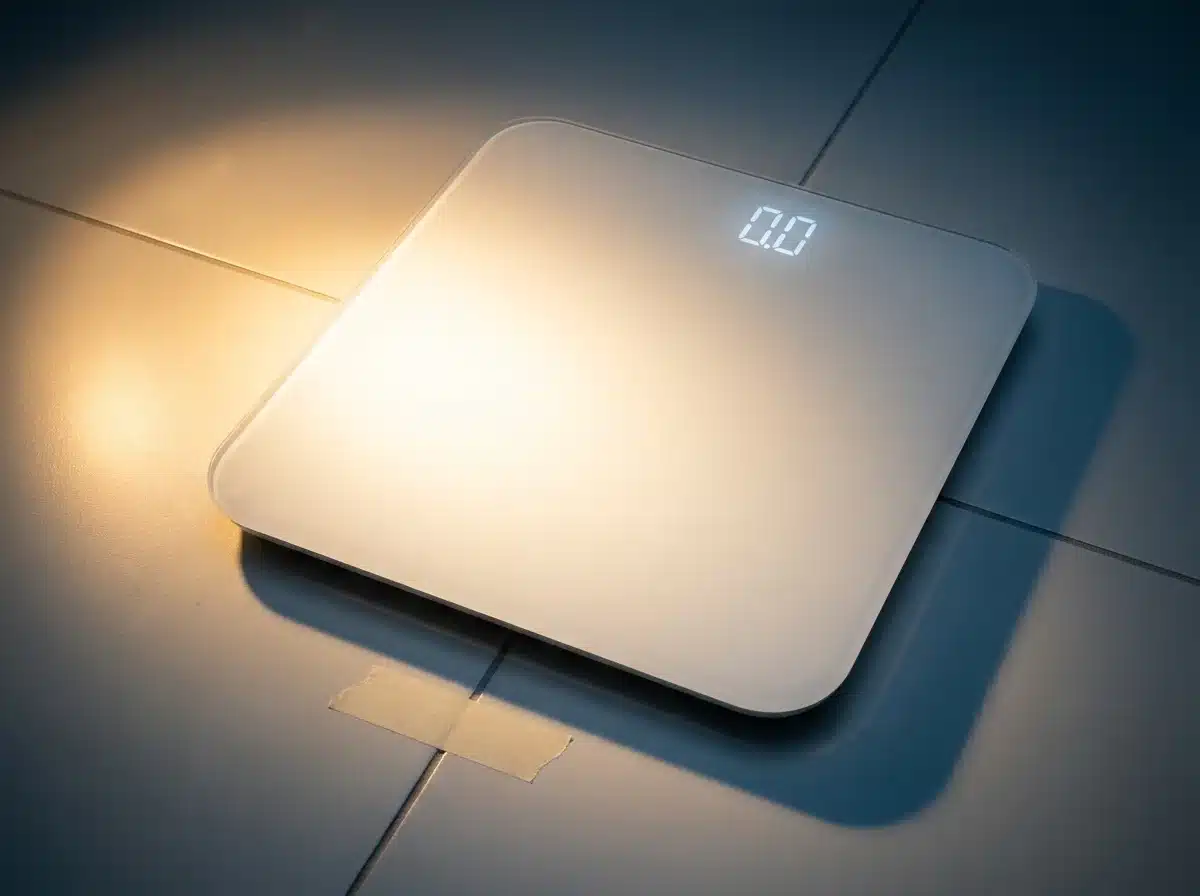 Marking the exact spot with a small piece of tape is the single most effective consistency habit.
This is exactly how to calibrate a bathroom scale in practice — two stages, starting with the simple one.
Standard self-calibration (try this first):
- Place the scale on a hard, flat floor in a fixed spot. Mark it with a small piece of tape if needed — using the same spot every time is the most important habit for consistent readings. Check that all four feet make solid contact, ideally with no grout line under any of them.
- Tap to wake, then step off. Step on briefly with your full weight, then step off. This triggers the self-calibration routine most digital bathroom scales run on first contact. Wait for the display to show a stable 0.0 — don't step on to weigh until you see it.
- Step on to weigh. Stand in the center with weight evenly distributed on both feet, looking straight ahead rather than down at the display — shifting to look down shifts your weight forward and changes the reading. Wait for the reading to lock.
- Record and step off, then repeat once. The two readings should land within 0.2kg of each other. If they don't, move to the full reset below.
Full reset (when self-calibration doesn't fix it):
- Remove the batteries and drain residual power. Open the compartment on the underside, remove all batteries, then press and hold the power button for 10-15 seconds. This helps discharge the electronics fully before you reinsert fresh batteries — always the complete set at once, never mixing old and new.
- Reinsert batteries, wait for 0.0, then tap to self-calibrate. Place the scale in its usual spot and let it display 0.0 on its own for about 60 seconds without stepping on. Then step on briefly to trigger self-calibration, step off, and weigh normally. Test with three readings in a row — if they're all within 0.2kg, the reset worked. If they're still erratic, try a different floor spot before concluding the scale itself is faulty.
How to Calibrate a Bathroom Scale When You Don't Know the Brand Sequence
Part of learning how to calibrate a bathroom scale is accepting that exact reset procedures vary meaningfully across smart-scale brands and even between model generations of the same brand, so rather than hand you a confident table that's likely wrong for your specific unit, here's what's actually reliable: nearly every consumer bathroom scale self-calibrates the same way — step on briefly, step off, wait for 0.0 — and the full battery-removal reset above works as a fallback across virtually all of them, smart or not. For app-connected scales (Renpho, Withings, Eufy, and similar), a factory reset is usually available in the app's device settings menu, which resets both the hardware and any stored baseline data — check your specific app rather than guessing a button sequence.
One genuine exception worth knowing: some Tanita body composition scales, particularly professional models, include a real menu-based user calibration mode accessed via a SET or similar button, distinct from the simple self-calibration routine every consumer scale uses. If your scale has a dedicated calibration menu rather than just power and unit buttons, check the manual — it may support genuine calibration against a known weight, not just a reset.
Accuracy Test
Bathroom scales don't need to be perfectly accurate — they need to be consistently accurate. A scale that always reads 0.5kg high is still useful for tracking progress. A scale that reads differently every time is not, regardless of whether any single reading happens to be "correct."
To test absolute accuracy, use a known-weight dumbbell or a sealed bag with a printed net weight.
Scale accuracy test
Good reference objects: a dumbbell with marked weight, a sealed 5kg bag of potatoes, or a 10kg bag of rice with net weight printed.
For a more detailed pass/fail breakdown, use the full accuracy tester on our digital pocket scale guide.
Troubleshooting How to Calibrate a Bathroom Scale
| Symptom | Most likely cause | Fix |
|---|---|---|
| Different reading every time I step on | Scale moved between readings; soft surface; stepping on before 0.0 appears | Use the exact same spot; hard floor only; always wait for 0.0. |
| Reads differently in different rooms | Floor surface or levelness varies between rooms | Find the flattest hard floor in the house; mark the spot; never move the scale. |
| Reads lower in the morning, higher at night | Normal body weight fluctuation, not a scale error | Always weigh at the same time of day — morning before eating is the most consistent reference point. |
| Reads consistently higher or lower than the doctor's scale | Different calibration reference, different floor surface | Normal — no two scales are calibrated identically. Track your own scale's trend, not the absolute number. |
| Shows Lo or a battery icon | Low battery | Replace all batteries at once with a complete fresh set. |
| Display flickers or shows random numbers | Battery contact corrosion or water damage | Remove batteries, clean contacts with a dry cloth, reinsert; let it dry fully if water damaged. |
| Reads correctly but body fat % seems wrong | BIA body composition measurement is affected by hydration | Measure at the same time each day, ideally morning before drinking anything. |
How to Calibrate a Bathroom Scale: How Often
Knowing how to calibrate a bathroom scale is only half the job — knowing how often matters just as much. The tap-and-wait self-calibration routine should happen every single session — it takes ten seconds and ensures the scale starts from a correct zero reference each time.
A full reset (battery removal plus power drain) should happen: - Monthly, as routine maintenance - Whenever readings become inconsistent - After moving the scale to a new location - After replacing batteries - After the scale is dropped or knocked
The single most important rule: never skip the tap-and-wait step. Step on briefly to wake the scale, step off, wait for 0.0, then step on to weigh. Skipping it means the scale isn't truly zeroed — most bathroom scale "inaccuracy" complaints disappear completely once people adopt this routine consistently. It costs about ten seconds, and it's the one habit that separates a scale you can trust from one you're constantly second-guessing.
Frequently asked questions
How do I calibrate a bathroom scale? Most digital bathroom scales self-calibrate: step on briefly, step off, wait for 0.0, then step on to weigh. For a full reset when readings are inconsistent, remove the batteries, hold the power button for 10-15 seconds, insert fresh batteries, and wait for 0.0. Always use the same spot on a hard, flat floor.
Why does my bathroom scale give different readings? This is the question behind most searches for how to calibrate a bathroom scale in the first place. Three common causes: using the scale in a different spot each time, not waiting for 0.0 before stepping on, and a low battery. Fix by using the same spot, running the tap-and-wait routine every time, and replacing batteries. If readings still vary by more than 0.2kg, do a full reset.
My two bathroom scales give different readings — which is right? Possibly both. An informal test of 10 bathroom scales by Pylon Electronics found every model reasonably accurate regardless of brand, with the worst reading off by just 1.8 pounds at 110 pounds. What matters for weight tracking is consistency, not matching another scale exactly — pick one scale, use it the same way every time, and track the trend.
How often should I calibrate a bathroom scale? The tap-and-wait self-calibration routine: every session. Full reset (battery removal): monthly, or whenever readings become inconsistent. Always reset after moving the scale to a new location or replacing batteries.
Can I use a bathroom scale to weigh objects? Yes, for objects within the scale's capacity, using the same zero-then-weigh process. For anything under 1kg, bathroom scales are usually too coarse — most read in 0.1 or 0.2kg increments — so a food scale or postal scale is the better tool for small objects.
More Related Guides
Now that you know how to calibrate a bathroom scale, here are related guides worth bookmarking:
- How to Calibrate a Digital Pocket Scale — scalecalibration.net/how-to-calibrate-digital-pocket-scale/ — the interactive coin calculator and full accuracy tester.
- How to Calibrate a Baby Scale — scalecalibration.net/how-to-calibrate-a-baby-scale/ — infant weight tracking, same load-cell principle, higher stakes.
- How to Calibrate a Food Scale — scalecalibration.net/how-to-calibrate-a-food-scale/ — for small objects too fine for a bathroom scale's resolution.
- Calibration Weights: Which Class & Size — scalecalibration.net/calibration-weights/ — for the scales in this guide series that do use certified weights.