By Jayson · Updated July 2026 · 8-minute read
Quick answer: To calibrate the Cen-Tech 59492 digital postal scale, hold MODE + POWER together until random numbers appear, press POWER for the zero step, then place a 5 lb calibration weight (the default — adjustable via TARE + HOLD) on the platform. Wait for CAL, then PASS. Here's the full Cen-Tech 59492 walkthrough, straight from Harbor Freight's own manual.
The Cen-Tech 59492 is Harbor Freight's stainless steel shipping scale, built to weigh packages up to 110 lb — a different job entirely from the gram-level pocket and jewelry scales in the same house brand. Its calibration sequence is different too, and it's clearly documented in Harbor Freight's own manual. Here it is, unembellished.
In this guide
- What the Cen-Tech 59492 actually is
- What's documented vs. what isn't
- How to calibrate it, step by step
- Finding a 5 lb calibration weight at home
- Tare, hold, and reading the units
- Troubleshooting a failed calibration
- Is it accurate enough for shipping?
- Who this scale actually suits
- Common mistakes
- FAQ
What the Cen-Tech 59492 actually is
The Cen-Tech 59492 is Harbor Freight's 110 lb stainless steel digital postal scale — a flat-platform shipping scale built for weighing packages, boxes, and parcels before you head to the post office or print a shipping label.
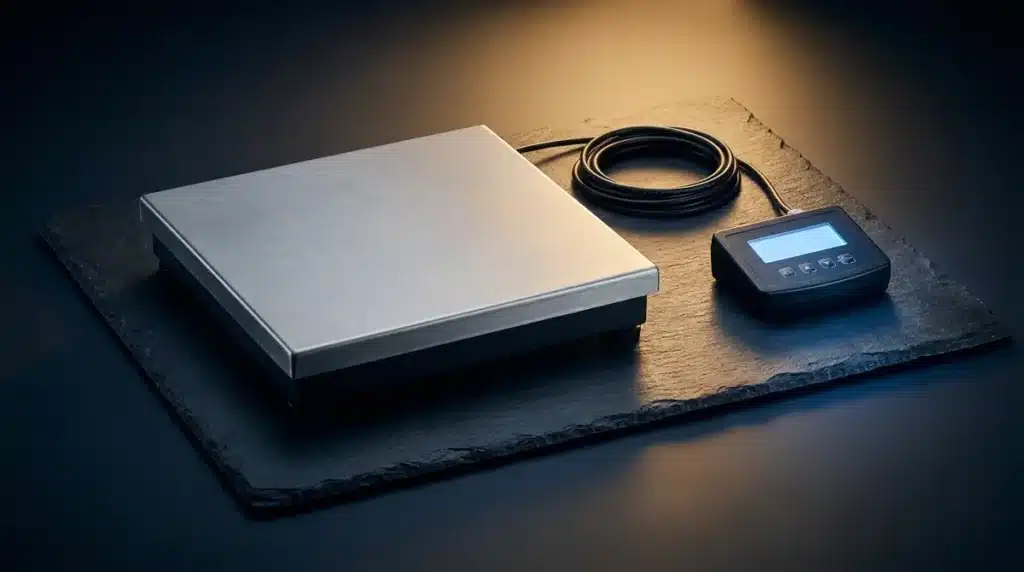
Its most distinctive feature, visible in Harbor Freight's own product photography, is a separate display console — not a screen built into the platform itself. The stainless steel weighing platform connects to a small black display unit by a coiled cable, similar to a corded phone handset. That console carries its own POWER, MODE, TARE, and HOLD buttons and a backlit LCD, and it's designed to be picked up and held or set beside the platform — genuinely useful when a large box sitting on the platform would otherwise block your view of an on-platform screen.
It's a genuinely different category of scale from the Cen-Tech 93543 pocket scale covered elsewhere on this site — built for pounds and kilograms at package scale, not grams and pennyweights for coins and jewelry.
What's Documented vs. What Isn't for the Cen-Tech 59492
Harbor Freight's official product page and PDF manual for the Cen-Tech 59492 are more detailed than some of Cen-Tech's smaller scales, but there are still real gaps worth being upfront about.
Confirmed — from the official manual, product listing, and the specs printed directly on the display console itself (visible in Harbor Freight's official product photo): - Maximum capacity: 110 lb (printed on the console as "Max: 110LB") - Readability: 0.1 oz (printed right next to it as "d=0.1OZ") - Units: ounces (oz), pounds (lb), kilograms (kg) - Tare function — subtracts a container's weight - Hold function — locks the current reading on the display - Auto-shutoff when idle - Power source: battery-operated (no AC adapter documented) - Platform: brushed stainless steel, low-profile, sitting on a black base - Display: a physically separate console connected to the platform by a coiled cable, not built into the platform itself
Still not published anywhere, including on the unit itself: - Exact platform dimensions - Battery type
Everything else above is now confirmed directly from official product photography, not inferred.
How to calibrate it, step by step
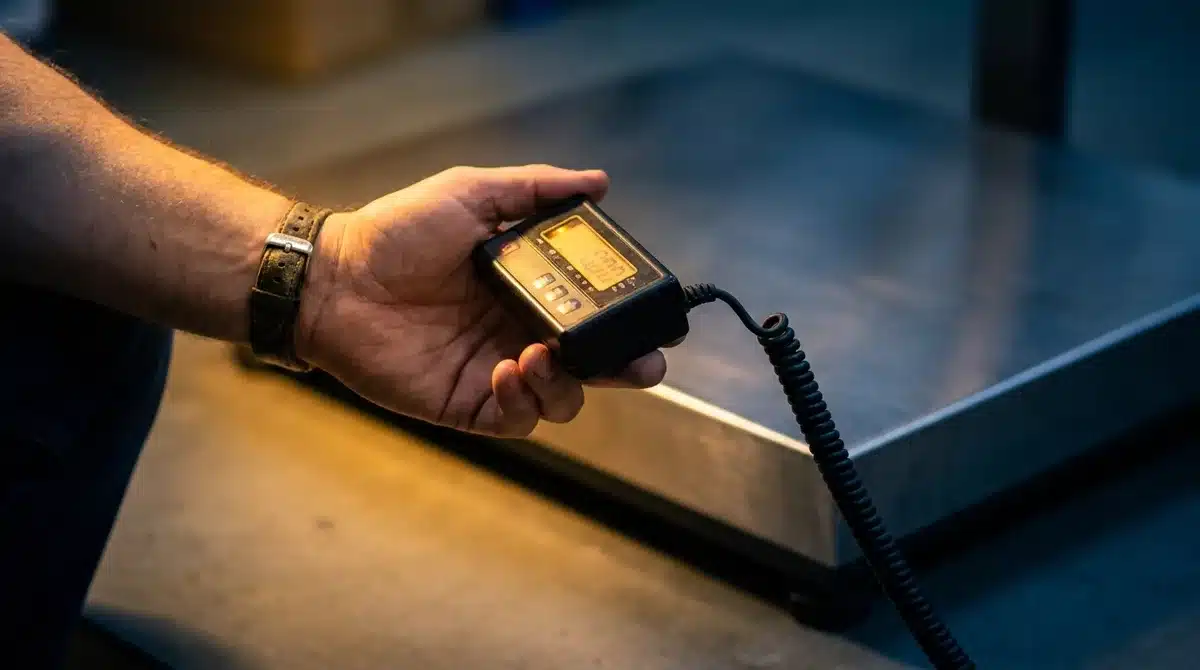 Center the calibration weight on the platform, and give the display a moment to settle before expecting a result.
This sequence is taken directly from Harbor Freight's owner's manual for the Cen-Tech 59492.
- Set up on a stable surface. Place the scale on flat, solid ground. The platform should be clean, dry, and completely empty.
- Enter calibration mode. Press and hold MODE and POWER together until the display shows random, flickering numbers.
- Zero the scale. Press POWER once. The display shows "2Ero" — confirming it has registered the empty platform as zero.
- Confirm the calibration weight value. Press MODE to select the weight the scale expects. The default is 5 lb. If you're using a different calibration weight, press TARE and HOLD to adjust the target value to match what you actually have.
- Place the weight. Put your calibration weight — 5 lb, or whatever value you set — in the center of the platform.
- Wait for PASS. The display shows CAL, then PASS, and the scale returns to normal weighing automatically. If PASS doesn't appear, the manual's guidance is to repeat the full process from step 1.
Unlike Cen-Tech's smaller pocket scales, the Cen-Tech 59492 lets you change the target calibration weight rather than being locked to a single fixed value — genuinely useful if a 5 lb weight isn't what you have on hand, as long as whatever weight you do use is accurate.
Finding a Calibration Weight for the Cen-Tech 59492
Five pounds is heavier than the coin-based tricks that work for smaller scales — there's no clean "count out some nickels" shortcut here, so it's worth being honest about the realistic options.
The most practical household substitute: an unopened 5-pound bag of sugar or flour is a common US retail size and lands close to 5 lb, though not with certified precision — retail fill tolerances mean the actual contents can be off by an ounce or more. For a rough field check, that's usually fine. For anything where shipping cost accuracy genuinely matters — see what weighs 50 pounds and what weighs 500 grams for how tightly shipping rate brackets are drawn — a real, certified 5 lb calibration weight is worth owning if you ship with any regularity.
The adjustable calibration target (step 4 above) means you're not locked into needing exactly 5 lb, either — if you own a different certified weight, set the scale to match it instead of forcing a 5 lb reference you don't have.
Tare, hold, and reading the units
Tare is the function you'll use most for shipping: place an empty box or envelope on the platform, press TARE, and the display zeroes out. Whatever you add afterward shows as net weight only — exactly what you need when a shipping label asks for the weight of the contents, not the packaging.
Hold locks the current reading on the display, useful when a large package blocks your view of the screen while it's still on the platform — press it, lift the package, and read the locked number at your convenience.
Units cycle with a short press of MODE during normal weighing: oz → lb → kg and back around. For most US shipping purposes, lb is what you'll use most, but having oz available matters for lighter packages where a fraction of a pound makes a real pricing difference — see our guide on what weighs 500 grams for why that precision matters at shipping-bracket boundaries.
Troubleshooting a Failed Cen-Tech 59492 Calibration
If calibration won't pass: - Confirm your calibration weight exactly matches the value shown on the display — a close-but-not-exact substitute (like an imprecise bag of sugar) can cause a fail if the scale's tolerance is tight. - Make sure the platform was genuinely empty during the "2Ero" step — even a small amount of residual weight throws off the zero point everything else is calibrated against. - Check that the surface underneath is level and rigid — a scale sitting on carpet, an uneven floor, or a wobbly table will struggle to calibrate consistently. - Repeat the entire sequence from step 1 rather than trying to resume partway through.
If it still won't calibrate after repeated attempts, Harbor Freight's own manual recommends having it serviced by a qualified technician — that's their documented fallback, not ours, and it's worth taking seriously if the scale genuinely won't hold a calibration despite a clean setup and an accurate weight.
For everyday reading problems (not full calibration failures): - Check the battery — a low battery is one of the most common causes of unstable or drifting readings on any battery-powered scale. - Clean the platform of any residue or debris. - Power cycle the scale, let it settle at zero on an empty platform, and re-weigh.
Is the Cen-Tech 59492 Accurate Enough for Shipping?
Honest answer: for typical home shipping — figuring out roughly what a package weighs before printing a label — yes, especially once freshly calibrated. The console's printed 0.1 oz readability is fine resolution for a consumer scale, well below the level most shipping brackets are drawn at.
Where it still pays to be careful is right at pricing bracket boundaries. A 0.1 oz readability tells you how finely the display can distinguish weights, not how accurate the underlying calibration is — those are different things, and only regular calibration checks confirm the second one. If a shipping rate changes at a specific weight threshold and your package is close to that line, verify at the post office or shipping counter before committing, especially for anything where a miscalculation would cost you a meaningfully higher rate. The scale is a genuinely useful planning tool; it's not a substitute for the carrier's own official weighing when the difference actually matters financially.
Who this scale actually suits
A budget stainless steel postal scale like the Cen-Tech 59492 fills a specific gap, and it's worth knowing whether that gap matches your actual use.
Good fit: occasional-to-regular home shippers who want a quick, private way to estimate postage costs before heading to the counter; small online sellers packing and weighing orders at a kitchen table; anyone tired of guessing whether a package is "about 5 pounds" or genuinely needs to know.
Not a good fit: businesses that need legal-for-trade certification for commercial transactions billed by weight — a consumer scale like this one isn't certified for that use, regardless of how well it's calibrated. It's also not the right tool if you're shipping high volumes where even small systematic errors compound into real money — at that scale, a commercial-grade certified scale pays for itself quickly.
For the everyday case — most home shippers, most of the time — a freshly calibrated Cen-Tech 59492 does exactly the job it's built for: telling you roughly what a package weighs before you commit to a shipping method, with enough accuracy to avoid the worst surprises at the counter.
Common mistakes
- Using an inaccurate object as the calibration weight. The scale will faithfully calibrate itself to match whatever you place on the platform during setup — if that object isn't actually 5 lb (or your adjusted target), you've calibrated in an error, not removed one.
- Forgetting to account for packaging in the tare step. Tare the empty box first, then add contents — weighing a packed box without taring gives you gross weight, not the net weight most shipping labels ask for.
- Confusing display resolution with calibration accuracy. A 0.1 oz readout only means the display shows fine increments — it doesn't guarantee the zero point and calibration behind that number are correct. Don't stake a rate-bracket decision on a reading alone when the cost difference is significant.
- Skipping recalibration after moving the scale to a new surface. A scale calibrated on a hard floor can read differently on a different surface — recheck after any relocation, not just after a drop or impact.
- Ignoring low-battery warnings. A struggling battery is a common, easily fixed cause of readings that look like a calibration problem but aren't.
- Overloading the platform beyond 110 lb. Even briefly exceeding rated capacity can stress the load cell and introduce lasting errors — check an unusually heavy package's approximate weight another way first if you're anywhere near the limit.
- Expecting legal-for-trade accuracy from a consumer scale. This model is built for personal shipping estimates, not certified commercial transactions — know which one you actually need before relying on it.
Frequently asked questions
What calibration weight does the Cen-Tech 59492 use? The default is 5 lb, but it's adjustable — press TARE and HOLD during calibration mode to set a different value if you have a calibration weight of another size.
What is the maximum capacity of the Cen-Tech 59492? 110 lb (50 kg), confirmed on Harbor Freight's official product listing and owner's manual.
What units does the Cen-Tech 59492 support? Ounces (oz), pounds (lb), and kilograms (kg) — cycle through them with the MODE button during normal weighing.
Does the Cen-Tech 59492 have a tare function? Yes. Place an empty container or box on the platform, press TARE, and the display zeroes out — anything added afterward shows net weight only.
Why does my Cen-Tech 59492 fail to calibrate? Usually the calibration weight doesn't exactly match the selected target value, the platform wasn't empty at the zero step, or the surface isn't level and stable. Repeat the full sequence; if it keeps failing, the manual recommends professional service.
Can I use a bag of sugar instead of a real calibration weight? As a rough field substitute, yes — a 5 lb bag of sugar or flour gets you close. For precise shipping-cost decisions, a certified calibration weight is more reliable, since retail packaging isn't held to the same tolerance.
Does the Cen-Tech 59492 run on batteries or plug into the wall? Battery-powered, based on Harbor Freight's documentation — no AC adapter is mentioned in the official manual or product listing.
How is the Cen-Tech 59492 different from the Cen-Tech 93543 pocket scale? The Cen-Tech 59492 is a 110 lb stainless steel shipping scale with a MODE+POWER calibration sequence and an adjustable calibration weight; the 93543 is a small fold-open pocket scale for coins and jewelry with a fixed 500g target. See our 93543 guide for that model's full walkthrough.
Why does the display sit separate from the platform on a cable? It's a deliberate design choice for shipping use. A large box sitting on the platform would block a built-in screen, so the Cen-Tech 59492 puts the display on a coiled cable instead — you can hold it, or set it beside the platform, and still read the weight with the package in place.
Can I use this scale for a business that ships commercially? For estimating and packing purposes, sure — but it isn't certified as legal-for-trade, meaning it isn't approved for transactions where the buyer is charged based on the scale's exact reading. Check our guide on legal for trade scales if that distinction applies to your situation.
How often should I recalibrate a postal scale like this? Before any shipping session where cost accuracy matters, and at least monthly with regular use. Always recalibrate after moving the scale to a new surface, a battery change, or any noticeable drop or impact.
What should I do if the display shows an error instead of a weight? Check that the platform isn't overloaded beyond 110 lb first, since that's the most common cause of an error rather than a fault. If the load is within range, power cycle the scale, ensure the platform is empty and clean, and re-zero before trying again.
Related guides
- Cen-Tech Digital Scale: How to Calibrate, Reset & Use It — scalecalibration.net/cen-tech-digital-scale-a-short-guide/ — the main Cen-Tech 60332 guide.
- Cen-Tech 93543 Digital Pocket Scale — scalecalibration.net/cen-tech-93543-digital-pocket-scale/ — the smaller coin-and-jewelry model.
- What Weighs 50 Pounds — scalecalibration.net/what-weighs-50-pounds/ — why shipping weight brackets matter so much.
- Calibration Weights: Which Class & Size — scalecalibration.net/calibration-weights/ — for a genuine certified 5 lb reference.